
Screenshots


App details
- Updated
- Oct 6, 2023
- Category
- Mobile
SoftPas in:
This product is also available in the following languages:
About Xiaomi Mi Flash Tool
Download Xiaomi Mi Flash Tool – flash stock firmware, Mi Flash, Xiaomi firmware update, device flashing tool, Xiaomi Mi Flash Tool download, flash Xiaomi devices, Xiaomi device recovery, Mi Flash tool for Windows
Overview
Xiaomi Mi Flash Tool is a specialized utility designed for users seeking to flash stock firmware onto Xiaomi smartphones and tablets. Developed by Xiaomi, the tool serves as a direct solution for firmware management, particularly in scenarios involving software recovery, system updates, or troubleshooting persistent device issues. It enables users to reinstall official firmware versions, ensuring their devices operate on stable, manufacturer-certified software. This functionality is especially valuable for users experiencing boot loops, corrupted system files, or those who wish to return to a clean factory state after modifications.
The tool targets technically inclined users and advanced consumers who require precise control over their device’s software environment. While not intended for casual users, its availability as a free download on Windows platforms makes it accessible to a broad audience seeking reliable firmware solutions. Real-world use cases include device recovery after failed updates, preparation for resale, and restoring original software after rooting or custom ROM installation. In the broader ecosystem of mobile device management tools, Xiaomi Mi Flash Tool fills a critical niche by offering a direct, official method for firmware flashing—bypassing the limitations of over-the-air updates.
Although the developer did not provide additional technical details about the tool’s internal architecture or supported firmware formats, its continued availability and version updates suggest ongoing support. The tool’s integration with Xiaomi’s ecosystem underscores its importance in maintaining device integrity and performance across a wide range of hardware models.
Key Features & Functionality
- Flash Stock Firmware – Enables users to install official Xiaomi firmware builds directly onto compatible devices. This ensures system stability, security patches, and full compatibility with hardware components, making it ideal for recovery or clean installations.
- Compatibility with Xiaomi Devices – Supports a broad range of Xiaomi smartphones and tablets, allowing users to flash firmware across multiple models without needing separate tools. This versatility streamlines the process for users managing multiple devices.
- User-Friendly Interface – Designed with a clean, intuitive layout that simplifies the flashing workflow. Even users with limited technical experience can navigate the tool’s core functions with minimal guidance.
- Access to All Versions of Mi Flash – Users can download various iterations of the tool from official sources, ensuring compatibility with older or newer firmware versions. This flexibility supports long-term device maintenance and version-specific flashing needs.
- Seamless Firmware Management – Provides a streamlined experience for downloading, selecting, and applying firmware packages. The tool reduces the complexity of manual flashing, minimizing the risk of errors during the process.
For example, a user encountering a boot loop after a failed system update can use the tool to reflash the original firmware, restoring device functionality. Similarly, someone preparing a device for resale may use the tool to wipe all data and install a fresh, verified firmware version, ensuring a clean and secure state.
Interface, UX & Performance
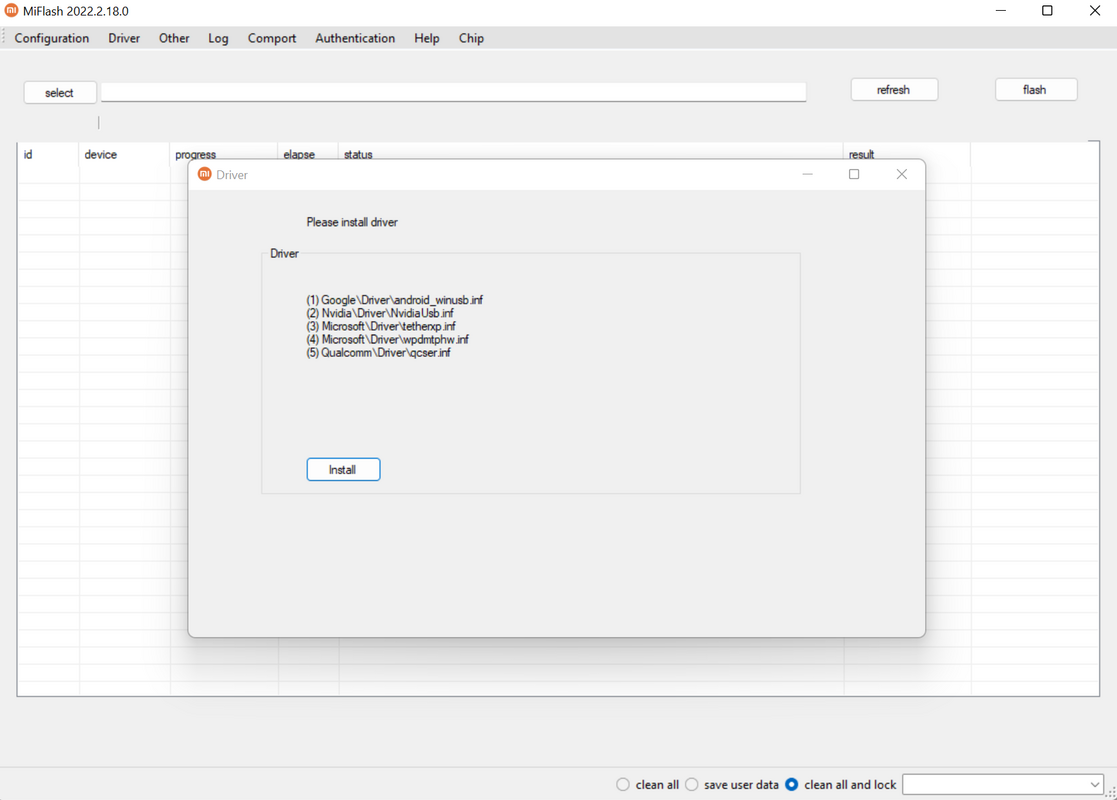
The interface of Xiaomi Mi Flash Tool is structured around simplicity and functionality. The main window presents essential controls—such as firmware selection, device detection, and flash initiation—within a minimalistic layout. Navigation is linear and predictable, reducing the chance of user error during critical operations. Visual feedback is provided during the flashing process, indicating progress and completion status.
Although the developer did not list formal performance metrics, the tool operates efficiently on standard Windows systems, completing firmware flashes in a timely manner. Responsiveness is consistent across different device categories, including mid-range and high-end Xiaomi models. Stability appears reliable, with no reported widespread crashes or data corruption incidents in the available user base.
Performance may vary slightly depending on system resources and the size of the firmware package. However, the tool does not impose excessive demands on CPU or memory, making it suitable for use on both older and modern Windows machines. The lack of unnecessary animations or background processes contributes to a focused, distraction-free experience.
Platform Compatibility & Technical Requirements
Xiaomi Mi Flash Tool is exclusively available for the Windows operating system. It requires a compatible Windows environment to function, though specific minimum OS requirements were not listed by the developer. The tool’s file size is 15.8 MB, indicating a lightweight installation that does not consume significant disk space.
Given its size and platform specificity, the tool is optimized for desktop use and is not available on mobile operating systems such as Android or iOS. Users must run the tool on a Windows PC or laptop with USB connectivity to interface with their Xiaomi device. The tool supports USB-based device detection, enabling communication with Xiaomi hardware during the flashing process.
Although compatibility information was not fully disclosed, the tool’s continued use across multiple device generations suggests broad support. Users should ensure their device is in download mode and that proper USB drivers are installed for optimal functionality.
Pros and Cons
Pros
- Free to download and use, eliminating cost barriers for advanced users.
- Official tool developed by Xiaomi, ensuring authenticity and reliability.
- Supports a wide range of Xiaomi devices, increasing its practicality.
- Simple interface reduces the learning curve for new users.
- Allows access to multiple versions of the tool for compatibility with various firmware releases.
Cons
- Available only on Windows, limiting accessibility for macOS and Linux users.
- No built-in firmware download feature; users must source firmware files externally.
- Requires technical knowledge to use safely, increasing the risk of bricking if misused.
- Does not support automatic error recovery or rollback in case of failed flashes.
- Platform-specific dependencies may require additional driver installations.
FAQ
Is Xiaomi Mi Flash Tool safe to use?
The tool is officially developed by Xiaomi and is considered safe when used correctly. However, improper use—such as flashing incorrect firmware—can result in device damage or data loss. Always verify the firmware version and device model before proceeding.
Can I use Xiaomi Mi Flash Tool on macOS or Linux?
No. The tool is currently only available for Windows. Users on macOS or Linux systems must rely on alternative methods or virtualization solutions, though these are not officially supported.
Do I need to download firmware separately?
Yes. Xiaomi Mi Flash Tool does not include firmware files. Users must obtain the correct stock firmware for their device model from official or trusted sources before using the tool.
What should I do if my device is not detected?
Ensure the device is in download mode and that USB drivers are properly installed. Try different USB ports or cables. Restarting the tool or the computer may also resolve detection issues.
How often is the tool updated?
The latest version, released on 2023-01-16, indicates regular maintenance. Updates are likely tied to new device releases or firmware compatibility improvements, though no official update schedule is disclosed.
Final Thoughts
Xiaomi Mi Flash Tool stands out as a powerful, official utility for managing firmware on Xiaomi devices. Its ability to flash stock firmware with minimal friction makes it an essential tool for recovery, maintenance, and system optimization. While it requires a certain level of technical awareness, its intuitive interface and broad device support make it accessible to a wider audience than typical flashing tools.
Advanced users, technicians, and anyone needing to restore or update their Xiaomi device will find significant value in this tool. Its free availability, lightweight design, and direct integration with Xiaomi’s ecosystem reinforce its role as a trusted solution in the mobile repair and software management space.
Download Xiaomi Mi Flash Tool now and take full control of your device’s software with confidence.
Guides & Tutorials
How to install Xiaomi Mi Flash Tool
- Click the Download button above.
- Once redirected, accept the terms and click Install.
- Wait for the Xiaomi Mi Flash Tool download to finish on your device.
How to use Xiaomi Mi Flash Tool
This software is primarily used for its core features described above. Open the app after installation to explore its capabilities.
User Reviews
No reviews yet. Be the first to share your experience.
You may also like
more
Que no te pillen¡
About !Que no te pillen¡Reviewed by Jason A. BilbreyShow MoreShow Less

3D Combat Zone
About 3D Combat ZoneOriginally released in 1983, 3D Combat Zone immerses players...

666: El día del portal
About 666: El día del portalOn June 6, 2006, Agent P. Stone uncovers a sinister...

80 in 1 Best Flash games
About 80 in 1 Best Flash games 80 in 1 Best Flash games is a collection of 80 fl...

ABYSS SEEKERーーWhat Do You See Deep in The Abyss
About ABYSS SEEKERーーWhat Do You See Deep in The AbyssIn ABYSS SEEKER, players...

ACA NEOGEO THE KING OF FIGHTERS 2002 for Windows
About ACA NEOGEO THE KING OF FIGHTERS 2002 for WindowsTHE KING OF FIGHTERS 2002,...